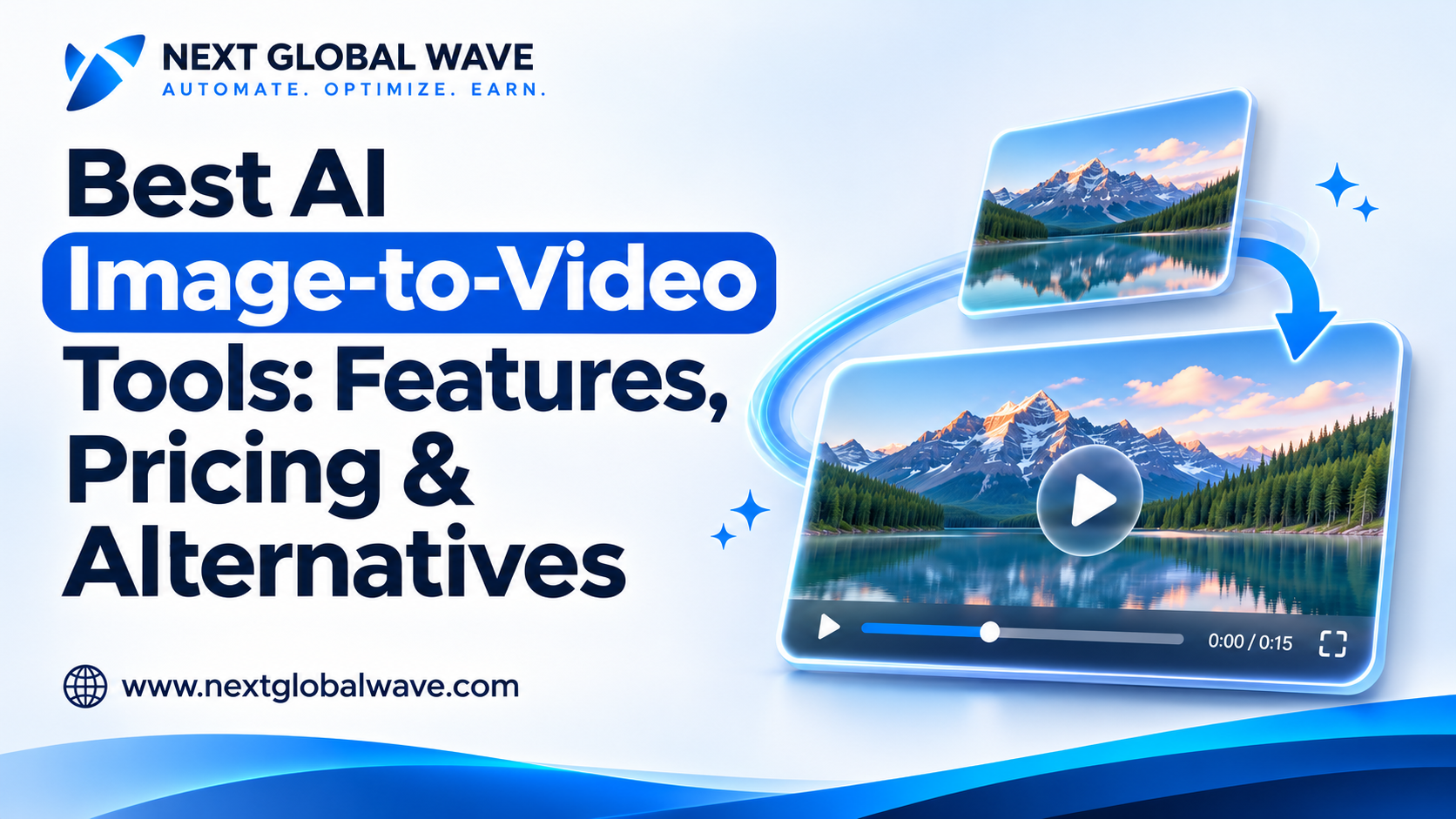
YouTube creators, digital marketers, and content production teams constantly look for the best AI Image-to-Video tools to create engaging videos without spending excessive time and money on traditional video production. AI image-to-video tools have become increasingly useful, letting creators turn static photos, illustrations, and digital graphics into dynamic video clips.
For YouTube creators, these capabilities can simplify content production. Instead of recording every scene manually, creators can generate visual assets and assemble videos using AI-powered workflows.
However, not every platform offers the same capabilities. Some specialize in realistic image animation, while others provide advanced camera controls, character consistency, voice generation, or integrated video editing.
Pricing is another important consideration. Certain platforms offer free daily credits, while others operate through monthly subscriptions or credit-based generation systems. The actual cost of producing a video also depends on its duration, resolution, model quality, and the number of attempts required to achieve the desired result.
In this blog, we compare the best AI image-to-video tools, explore their features and pricing. we will also discuss their alternatives and explain which platforms are suitable for different content creation requirements.
What Are AI Image-to-Video Tools?
AI image-to-video tools are software applications that use artificial intelligence to transform static images into moving video sequences.
These platforms analyse uploaded images and generate motion based on text prompts, reference images, camera instructions, or predefined animation settings.
For instance, a fashion brand can upload a clothing photograph and generate a promotional video featuring flowing fabric, subtle camera movements, and realistic lighting effects.
Most AI image-to-video generators are accessible through web applications, while some also provide mobile access or integrations with existing creative software.
Depending on the platform, their capabilities may include:
- Transforming photographs, illustrations, and digital graphics into animated videos.
- Generating realistic movements, facial expressions, and environmental effects.
- Applying camera movements such as pans, tilts, zoom-ins, and tracking shots.
- Generating synchronized background sounds, dialogue, and other audio elements.
- Maintaining character and object consistency across multiple scenes.
- Producing short-form videos for advertisements, YouTube Shorts, TikTok, and Instagram Reels.
- Exporting videos in different resolutions and aspect ratios.
Most platforms offer a combination of free and paid plans, although free access may include limited credits, watermarks, restricted resolutions, or shorter video durations.
What Features Should You Look for in the Best AI Image-to-Video Tools?
Choosing an AI image-to-video generator requires more than comparing subscription prices. You also need to evaluate its animation quality, editing controls, output specifications, and suitability for commercial projects.
Here are the essential features worth examining before choosing a platform.
1. Animation Quality and Visual Realism
The quality of animation is one of the most important factors when evaluating an AI image-to-video tool.
A good generator should animate static elements naturally without unnecessarily changing the original image.
For example, if you upload a photograph of a person standing beside a flowing river, the AI should animate the water while preserving the person’s appearance and the surrounding environment.
Look for tools that can generate:
- Natural facial expressions and body movements.
- Flowing hair and realistic fabric movements.
- Moving water, drifting steam, and environmental effects.
- Consistent lighting and shadows.
- Smooth transitions without distorted textures or warped surfaces.
Advanced models can produce more convincing movements while preserving important details in the original image.
2. Camera Movement and Directional Controls
Camera controls allow creators to determine how the virtual camera moves throughout a generated scene.
Rather than relying entirely on automatic animation, look for platforms offering directional controls such as:
- Panning and tilting.
- Zoom-ins and zoom-outs.
- Push-ins and pull-outs.
- Tracking shots.
- Camera rotations and custom viewing angles.
These controls are particularly useful for filmmakers, advertisers, and creators who want more cinematic results.
For example, a product photograph can be transformed into a promotional video featuring a gradual camera push-in, highlighting the product’s texture and design.
3. Keyframing and Start-End Frame Controls
Keyframing allows creators to define how a scene changes between specific points in a video.
Some AI video generators allow users to upload a starting image and an ending image. The AI then generates motion connecting the two frames.
This capability is useful when creating:
- Product transformation videos.
- Cinematic scene transitions.
- Character movements.
- Before-and-after demonstrations.
- Continuous visual sequences.
Start-frame and end-frame controls provide more direction over the generated result than a basic text prompt.
4. Character and Object Consistency
Character consistency becomes particularly important when producing longer YouTube videos, animated stories, advertisements, or documentary-style content.
One of the common challenges with AI-generated videos is that characters and objects may change appearance between clips.
For example, a character might have different facial features, clothing, or proportions in the next generated scene.
Look for platforms that support reference images, character sheets, multiple asset references, and scene continuity features.
These capabilities help creators maintain consistent appearances across multiple shots.
5. Integrated Audio and Voice Generation
Visual quality is important, but audio also plays a major role in video production.
Some platforms offer native sound generation, ambient audio, dialogue, or synchronized sound effects.
Others integrate AI voiceovers, text-to-speech capabilities, and multilingual narration.
These features are particularly useful for YouTube automation, educational videos, product explainers, and social media advertisements.
However, it is important to distinguish between native audio generation and integrated voiceover functionality. Not every image-to-video generator offers both.
6. Resolution and Video Duration
Resolution and clip duration directly affect the usefulness and production cost of an AI-generated video.
Some tools generate short clips of approximately five seconds, while others support longer sequences or extensions.
When comparing platforms, examine their supported output specifications:
- Standard definition and lower-resolution previews.
- 720p and 1080p video generation.
- 2K and 4K output where supported.
- Maximum clip duration.
- Video extension capabilities.
- Frame rates and export formats.
Remember that 4K upscaling is not necessarily the same as native 4K generation.
7. Commercial Usage Rights and Workflow Integration
If you create videos for clients, businesses, or paid advertising campaigns, commercial usage rights should be part of your evaluation.
Check whether the platform permits commercial use under your selected subscription, whether any restrictions apply to generated assets, and what licensing conditions cover uploaded reference material.
Also consider workflow integration.
Direct exports, editing timelines, and compatibility with tools such as Adobe Premiere Pro, After Effects, and CapCut can make production considerably easier.
A platform that generates excellent clips but requires repeated downloads and uploads may create unnecessary work for a busy production team.
Best AI Image-to-Video Tools Compared: Features and Capabilities
The market for AI video generation includes specialized image-animation platforms, AI filmmaking applications, and all-in-one video creation suites. Each category serves different production requirements.
Here are some of the leading platforms worth considering.
1. Kling AI
Kling AI is a strong option for creators who want realistic image animation, cinematic movements, and greater control over generated scenes.
Instead of simply animating a photograph, Kling allows users to guide the movement of subjects and objects through prompts and reference assets.
Its notable capabilities include:
- Image-to-video and text-to-video generation.
- Start-frame and end-frame controls.
- Motion control and reference-based generation.
- Character and object references.
- Lip-sync and audio-related generation features.
- Different output durations and aspect ratios.
Kling is particularly useful for cinematic advertisements, product videos, character animation, and short-form storytelling.
Best suited for: Creators who prioritize realistic physics, subject movement, and cinematic image animation.
Alternative: Runway and Google Veo.
2. Runway
Runway is designed for creators who want more control over their video production workflows. It combines AI video generation with editing and creative tools.
Its image-to-video capabilities are useful for transforming photographs into cinematic clips, producing B-roll, and experimenting with camera movements.
Important features include:
- Image-to-video and text-to-video generation.
- Advanced video generation models.
- Motion and camera control.
- AI image and video editing.
- Voice, music, and sound-effects generation.
- Video upscaling and creative workflow tools.
Runway is particularly valuable for independent filmmakers, creative studios, and YouTube creators who need greater control over their visual storytelling.
Best suited for: Filmmaking, cinematic storytelling, B-roll, and advanced creative workflows.
Alternative: Kling AI and Adobe Firefly.
3. Adobe Firefly
Adobe Firefly is worth considering for businesses, designers, and creative professionals who want image-to-video generation within an established creative workflow.
It allows users to upload photographs or AI-generated images and apply camera movements to transform them into video clips.
Its key features include:
- Image-to-video generation.
- Camera controls, including pan, tilt, and zoom.
- Video editing and timeline functionality.
- Multiple AI video models through partner integrations.
- Video exports and integration with Adobe creative applications.
- Commercially oriented generation through the Adobe Firefly model.
One of its important advantages is its approach to commercially safer generation. Adobe states that its Firefly model is trained on licensed and public-domain content. However, this should not be interpreted as automatic clearance of every uploaded image or every third-party model output.
Best suited for: Commercial creative projects, marketing teams, designers, and Adobe-based production workflows.
Alternative: Runway and Freepik.
4. Google Veo
Google Veo is another important option for creators interested in realistic AI-generated videos.
Through Google’s video-generation ecosystem, including Flow, users can work with image-to-video and text-to-video workflows.
Its capabilities include:
- Image-to-video generation.
- Cinematic scene generation.
- Natural-looking motion.
- Native audio generation on supported models.
- Reference-based visual workflows.
- Video generation and editing through Google Flow.
Google Flow is particularly useful for creators who want to experiment with cinematic scenes, combine visual references, and develop sequences from individual shots.
Best suited for: Photorealistic scenes, cinematic storytelling, and videos requiring synchronized audio.
Alternative: Kling AI and Runway.
5. Canva Magic Studio
Canva is a practical choice for creators who want to combine graphic design, AI-assisted content creation, and social media publishing.
Its AI capabilities help users develop visual content and incorporate generated video into existing design workflows.
Features worth exploring include:
- AI-powered image and video creation.
- Social media templates.
- Product and promotional designs.
- Video editing and resizing.
- Brand assets and design libraries.
- Integration with other Canva design tools.
For example, an online restaurant can use its existing menu photographs to develop promotional social media content. A digital marketer can also create multiple visual variations for different platforms.
However, the availability of specific image-to-video features depends on the Canva plan and regional feature access.
Best suited for: Social media graphics, product showcases, and quick marketing content.
Alternative: Adobe Firefly and InVideo AI.
6. HeyGen
HeyGen is especially useful for creators who want to turn images, scripts, and reference materials into presenter-led videos.
Its main strength is AI avatar generation rather than conventional cinematic image animation.
Its capabilities include:
- AI-generated talking avatars.
- Photo-to-avatar workflows.
- Lip-sync functionality.
- AI voice generation.
- Multilingual video creation.
- Script-to-video workflows.
- Video translation and localization.
For example, a business can use an AI presenter to explain a product, introduce a service, or deliver an advertisement in multiple languages.
Best suited for: Talking photographs, corporate explainers, multilingual advertisements, and presenter-led content.
Alternative: Synthesia and InVideo AI.
7. InVideo AI
InVideo AI is more of an all-in-one video creation platform than a specialized image-to-video generator.
It is useful for creators who want to convert scripts, prompts, and visual assets into complete videos.
Its features include:
- Script-to-video generation.
- AI-generated voiceovers.
- Stock footage and visual assets.
- AI video models, depending on subscription.
- Video editing and timeline tools.
- Social media video production.
For YouTube creators, this can simplify the process of creating narrated videos, explainers, and promotional content.
Best suited for: B-roll, narrated videos, YouTube content, and short-form advertisements.
Alternative: HeyGen, Canva, and traditional AI video editors.
8. Freepik
Freepik is particularly interesting because it brings multiple creative capabilities into one workspace.
Rather than relying on a single video model, creators can access different AI image, video, and audio models depending on their subscription and available features.
Its capabilities include:
- Multiple AI video generation models.
- Image-to-video workflows.
- Image and video editing.
- AI upscaling.
- Audio and voice generation.
- Stock assets and creative resources.
- Shared creative workspaces.
This can be useful for agencies and content production teams that regularly experiment with different AI models.
Best suited for: High-volume creative production, agencies, and users who want access to multiple AI models through one platform.
Alternative: Adobe Firefly and Runway.
Comparison of the Best AI Image-to-Video Tools
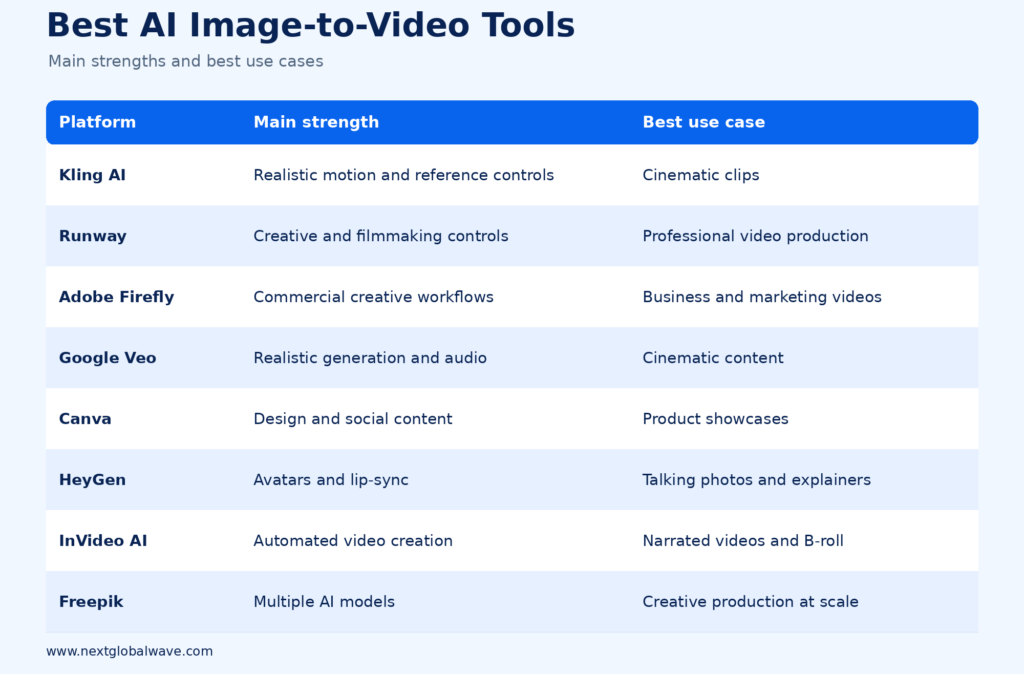
Best AI Image-to-Video Apps and Their Alternatives
If you are searching for the best image-to-video AI apps and their alternatives, it is important to understand that different platforms offer different levels of control.
Some prioritize ease of use, while others focus on professional editing, realistic animation, or advanced generation models.
For beginners, Canva and InVideo AI offer accessible creative workflows. Creators who need more control over motion and cinematic scenes may prefer Kling or Runway. Businesses already working with Adobe applications may find Firefly more convenient.
Similarly, Freepik can be an interesting alternative for creators who want to compare multiple models without maintaining separate subscriptions to every platform.
Before selecting an application, consider its supported devices, export options, credit limits, and whether the free version allows commercial use.
Can You Choose the Best AI Image-to-Video Tool According to Your Niche?
Absolutely. In fact, choosing an AI video generator according to your content niche is one of the most practical ways to avoid unnecessary subscription expenses.
A tool that works exceptionally well for cinematic storytelling might not be the best choice for an e-commerce product advertisement.
Let’s explore some common use cases.
1. Food and Product Showcases
Recommended tools: Canva and Kling AI.
Food businesses and e-commerce brands can transform static product photographs into engaging promotional clips.
For example, an AI video generator can animate a food photograph with drifting steam, subtle camera movements, and realistic lighting.
Similarly, a skincare brand can animate a product photograph with a slow camera orbit, highlighting its packaging and visual details.
These clips can be used for:
- Product listing videos.
- Social media advertisements.
- Restaurant promotions.
- E-commerce product showcases.
- Promotional landing pages.
2. B-Roll and Short-Form Advertisements
Recommended tools: InVideo AI and Runway.
Short-form videos require engaging visuals that communicate an idea quickly.
InVideo AI can help creators develop narrated content using scripts, stock footage, and generated visuals. Runway can be used to create individual B-roll clips and cinematic inserts.
These tools are useful for:
- Instagram Reels.
- TikTok videos.
- YouTube Shorts.
- Product advertisements.
- Promotional campaigns.
3. Urban and Travel Branding
Recommended tools: Kling AI, Runway, and Google Veo.
Travel creators and urban lifestyle brands can use image-to-video generation to animate cityscapes, architecture, and landscape photographs.
Imagine uploading a photograph of a city at night and generating a sequence featuring moving traffic, illuminated buildings, reflections, and atmospheric weather effects.
These capabilities can make static travel photographs more engaging for destination marketing and travel storytelling.
4. Character and Portrait Animation
Recommended tools: HeyGen and Kling AI.
Character animation and talking photographs require a different set of capabilities.
Creators may want to animate a portrait, generate realistic facial expressions, or synchronize a character’s lip movements with an audio track.
HeyGen is particularly useful for presenter-style avatars and multilingual narration, while Kling can support more cinematic character animation.
These applications are useful for:
- Talking photographs.
- AI-generated presenters.
- Educational content.
- Multilingual advertisements.
- Character-driven storytelling.
5. Reviving Historical and Vintage Photographs
Historical photographs can also become moving visual assets.
Creators producing documentaries, historical explainers, or family-memory videos can use image-to-video tools to introduce subtle movement into old photographs.
For example, an AI generator can add gentle facial movement, natural expressions, or subtle camera motion to a vintage portrait.
The objective should be to preserve the original photograph’s identity and historical context rather than introduce exaggerated or misleading movements.
HeyGen and other portrait-animation applications may be useful depending on whether the desired result is a talking portrait or a subtle cinematic animation.
6. Concept-to-Video Workflows and Storyboarding
Recommended tools: Runway, Kling AI, and Google Flow.
Independent filmmakers and creative studios can use AI video generation during the planning and previsualization stages.
Instead of immediately producing an entire scene, creators can develop keyframes, experiment with lighting, and test different camera angles.
A typical workflow might involve:
- Developing a storyboard.
- Generating reference images for individual scenes.
- Uploading images into an image-to-video generator.
- Experimenting with camera movement.
- Comparing different visual styles.
- Assembling the selected clips into a continuous sequence.
Some platforms also support reference images and first-frame or last-frame controls, helping creators plan visual continuity.
7. Multi-Scene Character and Prop Continuity
For creators producing animated stories or longer YouTube videos, visual consistency across scenes is essential.
Reference-based generation allows creators to provide multiple images of the same character, product, or object.
This can include front-facing photographs, side angles, close-ups, and character sheets.
The AI model uses these references to help maintain consistent appearances across generated scenes.
However, consistency is not guaranteed. Creators should review each generated clip before combining it with other footage.
Where Can You Find Affordable AI Video Generation Tools for Product Listings?
If you operate an e-commerce business, you do not necessarily need an expensive video production setup to create attractive product videos.
Several AI video generation platforms allow businesses to animate existing product photographs and turn them into short promotional clips.
The best choice depends on your product category, the number of videos you need, and the quality you expect.
Here are some practical options.
Canva: Suitable for businesses that want to combine product visuals, graphic design, and social media content in one workspace.
Kling AI: Worth considering when you need realistic product movement, cinematic camera angles, and more detailed animation.
Adobe Firefly: Useful for businesses that want to animate product images and incorporate the resulting clips into a professional editing workflow.
Runway: A good option for producing more cinematic product advertisements and promotional B-roll.
Freepik: Worth exploring if you want access to multiple video generation models and other creative assets through one subscription.
Best AI Tools for Creating Narrated Videos with Voiceover
Image-to-video generation and narrated video production are related but different requirements.
An image-to-video tool focuses on animating existing visual assets. A narrated video generator combines visuals with spoken audio, captions, and sometimes automated editing.
If you create YouTube videos, explainers, educational content, or promotional advertisements, you may need both capabilities.
Here are some useful platforms to consider.
HeyGen: Best for Talking Avatars and Multilingual Narration
HeyGen is particularly useful when your video requires a presenter or talking avatar.
You can create a script, select an avatar, generate narration, and produce a video without recording yourself on camera.
Its multilingual capabilities also make it useful for businesses targeting audiences in different markets.
InVideo AI: Best for Automated Narrated Videos
InVideo AI is suitable for creators who want to develop videos from written scripts and prompts.
It can combine narration, visual assets, stock footage, and editing features into a more automated production process.
This makes it useful for YouTube explainers, educational videos, promotional content, and short-form videos.
Runway: Best for Custom Visuals and B-Roll
Runway is more focused on visual generation and creative control.
You can use it to generate cinematic B-roll, animate photographs, and develop visual sequences that can be combined with separately recorded or AI-generated narration.
Adobe Firefly: Best for Creative Editing Workflows
Adobe Firefly provides image-to-video generation, partner video models, and editing capabilities within its creative ecosystem.
Creators can generate visual inserts and incorporate them into a larger production workflow.
Which one should you choose?
If your primary requirement is an AI presenter, consider HeyGen. If you want to generate complete narrated videos from scripts, explore InVideo AI. If you need cinematic visual assets to accompany your narration, Runway and Adobe Firefly are worth considering.
AI Image-to-Video Tools: Pricing and Subscription Comparison
Pricing is one of the biggest factors when selecting an AI image-to-video platform.
Some services provide free credits for experimentation, while others offer monthly subscriptions with a fixed credit allowance.
However, the cheapest subscription does not always deliver the lowest production cost.
A platform might charge less per month but consume more credits for high-resolution generations. Another might offer access to several video models through one subscription, reducing the need to purchase multiple individual plans.
The following comparison provides an indicative overview of selected pricing options. Prices are in USD and can change with billing cycles, promotions, regional availability, and plan updates.
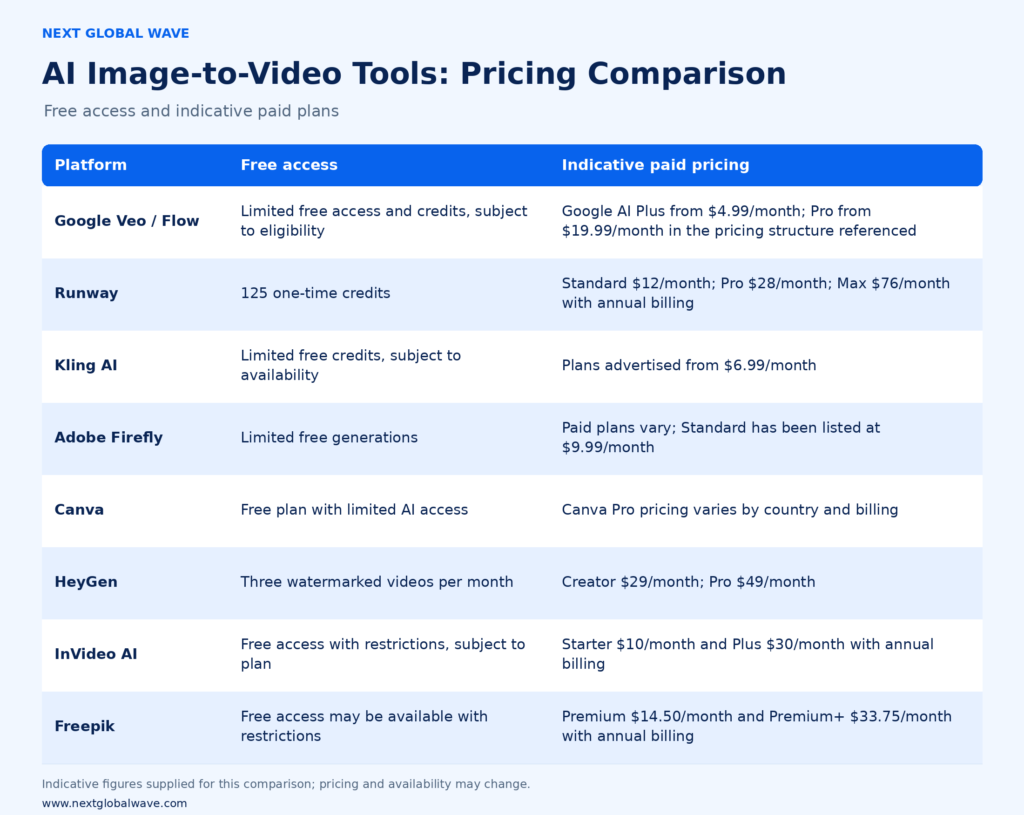
Sources: Official Runway pricing, Kling AI pricing, InVideo AI pricing, HeyGen pricing, Freepik pricing, Canva pricing, and AI video generator pricing comparison.
For Google, the exact credit allocation and available features depend on the Google AI plan and Flow eligibility. Check the Google Flow credit guide before estimating production costs.
Which AI Video Tools Offer Free Daily Credits?
If you are experimenting with AI video generation, start with platforms that provide free access or trial credits.
Kling AI and Hailuo AI have offered free-credit access at different times, although availability and limits can change.
Runway offers a one-time free credit allocation, while Adobe Firefly provides limited free generations.
Free plans are useful for testing animation quality, camera movements, and output consistency before purchasing a subscription.
However, they may include watermarks, restricted generation limits, or limitations on commercial use.
Which AI Video Subscription Is the Most Affordable?
There is no universal winner because affordability depends on your production requirements.
- For occasional experimentation: Start with free credits.
- For affordable creative production: Compare entry-level Runway, Kling, and Freepik plans.
- For automated narrated videos: Consider InVideo AI.
- For multilingual presenter videos: Consider HeyGen.
- For Adobe-based commercial workflows: Explore Adobe Firefly.
- For cinematic generation: Compare Google Veo, Kling, and Runway based on their credit consumption.
A useful rule is to calculate the cost of producing one approved, publishable video rather than comparing subscriptions alone.
Which AI Video Subscription Offers the Best Value?
If you regularly generate videos, an all-in-one creative platform may offer better value than purchasing separate subscriptions for every model.
Let’s examine some options.
InVideo AI: Best Value for All-in-One Video Creation
InVideo AI combines script-based video creation, editing, voiceovers, stock footage, and access to selected AI video models.
Its Starter plan is listed at $10 per seat per month with annual billing, while the Plus plan is listed at $30 per seat per month with annual billing.
The plans include different monthly credit allocations and model access.
It can be a practical option for creators who need narrated videos, advertisements, and social media content rather than only image animation.
Freepik: Best for Accessing Multiple AI Models
Freepik provides access to multiple image, video, and audio generation models through its creative workspace.
Its Premium plan is listed at $14.50 per month with annual billing, while Premium+ is listed at $33.75 per month.
The platform also provides creative assets, editing capabilities, and AI upscaling.
For creators who frequently experiment with different models, this consolidated workflow can reduce the need to maintain multiple separate subscriptions.
Runway: Best for Advanced Creative Control
Runway offers a free plan with 125 one-time credits.
Its Standard plan costs $12 per month with annual billing, while Pro costs $28 and Max costs $76 per month with annual billing.
The Standard plan includes 625 monthly credits, while Pro includes 2,250 and Max includes 9,500.
The number of videos you can generate depends on the model and clip duration. For example, Runway lists Gen-4.5 at 60 credits per five-second generation.
Its advanced editing, video generation, and audio capabilities make it useful for more demanding creative workflows.
Google Veo: Best for Cinematic Video Generation
Google Veo is worth considering if your priority is realistic video generation and synchronized audio on supported models.
Google Flow provides an environment for generating and editing video using Google’s models.
Subscription and credit availability depend on the Google AI plan, and different models consume different amounts of credits.
For creators who want to experiment with cinematic scenes and reference-based generation, it is a strong option to evaluate.
Adobe Firefly: Best for Commercial Creative Workflows
Adobe Firefly offers image-to-video generation, camera movement controls, and access to partner models.
Its Firefly video model is trained on licensed and public-domain content, which is an important consideration for businesses producing commercial creative assets.
The platform also supports video exports and integration with Adobe’s creative applications.
It is particularly useful for teams that want to generate and edit visual assets within a connected production workflow.
Real-World AI Video Production: Comparing Time, Cost and Workflow Efficiency
Subscription pricing is only one part of the production equation. The actual time and money required to create a finished video can vary considerably between platforms.
Your research includes a production comparison involving Freepik, Higgsfield, Leonardo AI, Adobe Firefly, and Google Veo.
The reported workflow involved creating a two-minute short film using AI-generated images and video clips.
The production assumptions included:
- Target video duration: Two minutes.
- Total planned shots: 48.
- Average shot duration: 2.5 seconds.
- Image-generation attempts: Approximately 460.
- Video-generation attempts: Approximately 280.
- Multiple generation attempts to obtain usable outputs.
The following figures are from the supplied research and should be treated as reported test estimates, not independently verified platform benchmarks.
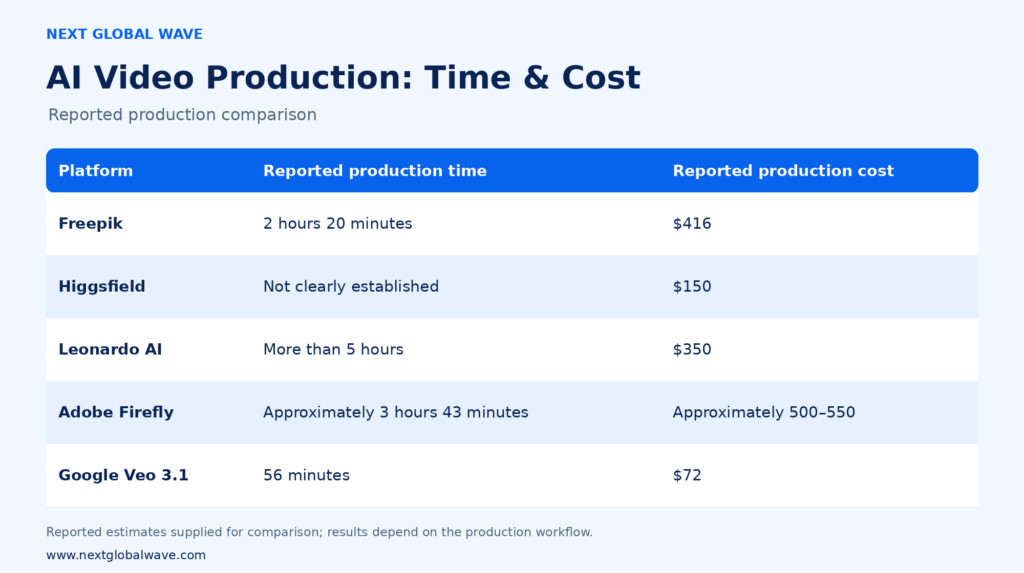
What Does This Comparison Tell Us?
Freepik: The reported workflow highlighted its access to multiple models, resolution options, and creative workspace. However, the production cost was relatively high.
Higgsfield: The supplied research identified it as a lower-cost option in this particular production exercise. Its cinematic presets and generation credits were useful, although the workflow reportedly involved additional exporting and uploading.
Leonardo AI: Its image-generation and creative tools were useful, but the reported workflow took considerably longer. This suggests that image-generation speed should also be considered when evaluating an end-to-end video production platform.
Adobe Firefly: Its multiple-model environment and visual editing workflow were useful for organizing creative assets. However, the reported production cost was higher than some alternatives.
Google Veo 3.1: The reported workflow completed the production in the shortest time and at the lowest estimated cost among the compared platforms.
These figures should not be used as universal price guarantees. Model versions, credit allocations, generation settings, subscription tiers, and the number of failed attempts can substantially change the outcome.
Before publishing this comparison as a first-party NextGlobalWave experiment, retain the original prompts, generation logs, subscription receipts, output settings, and time records. Also clarify whether the test used equivalent models, resolutions, and output lengths.
How to Choose the Right AI Image-to-Video Generator
Choosing the right tool becomes easier when you evaluate it against your actual production requirements.
Here is a simple decision-making framework.
If you are a YouTube creator: Look for image-to-video generation, AI voiceovers, script-to-video features, and automated editing. InVideo AI, Runway, and HeyGen are worth comparing.
If you are an e-commerce business: Prioritize product accuracy, realistic animation, high-resolution output, and commercial licensing. Explore Kling, Adobe Firefly, and Canva.
If you are an independent filmmaker: Look for reference-image support, camera controls, start-frame and end-frame generation, and scene continuity. Compare Runway, Kling, and Google Flow.
If you are a digital marketing agency: Consider workflow integration, access to multiple models, commercial licensing, and predictable credit costs. Freepik and Adobe Firefly are worth evaluating.
If you create educational or corporate videos: Prioritize narration, multilingual voiceovers, presenter avatars, and editing capabilities. HeyGen and InVideo AI are practical options.
Ultimately, the best AI image-to-video generator is not necessarily the most expensive or technically advanced platform. It is the one that consistently delivers the output you need without creating unnecessary production costs.
Which AI Image-to-Video Tool Should You Choose?
AI image-to-video technology is changing how creators, businesses, and marketing teams approach video production.
From animating product photographs to developing cinematic scenes, AI-powered platforms make it possible to produce engaging visual content without relying entirely on traditional filming and editing workflows.
However, choosing the right platform requires understanding your production requirements.
Kling AI is worth considering for realistic motion and cinematic animation. Runway offers advanced creative controls for filmmakers. Adobe Firefly provides a commercially oriented creative workflow, while Google Veo is an interesting choice for realistic video generation and synchronized audio.
For social media content and product showcases, Canva offers accessible design capabilities. HeyGen is useful for talking avatars and multilingual videos, while InVideo AI helps creators develop narrated videos through automated workflows. Freepik provides another option for accessing multiple creative models within one workspace.
Before committing to a paid subscription, experiment with free credits, compare generation quality, and calculate the actual cost of producing a finished video.
The best AI image-to-video tool is the one that matches your content niche, delivers consistent visual quality, and makes your production workflow more efficient without exceeding your budget.
At NextGlobalWave, we help businesses and content creators understand emerging digital technologies and identify practical solutions that support their content production and marketing objectives.
Explore AI-powered video creation at https://nextglobalwave.com/ and find the right YouTube automation agency to bring your creative ideas to life.