YouTube chapters are one of the simplest ways to improve the viewing experience on your channel. In many cases, adding them takes only a few minutes, but the impact can extend far beyond simple navigation.
Chapters break a video into clearly labeled sections, allowing viewers to jump directly to the information they want. For businesses publishing tutorials, product videos, webinars, educational content, podcasts, and other long-form videos, this can make content significantly easier to navigate.
There is another important benefit: YouTube chapters can provide additional context about your video’s structure and content. Clear timestamps and descriptive chapter titles help viewers and can give search engines more context about the topics covered in a video. Chapter information may also appear in Google Search as key moments, giving users another way to discover and access specific parts of your content.
Yet despite these benefits, many business YouTube channels still don’t use chapters consistently.
When researching leading company YouTube channels to develop a content strategy, you may notice an interesting pattern. Some established brands use chapters regularly, while others use them only occasionally or don’t use them at all. Even channels with strong growth don’t always take advantage of this simple optimization feature.
That’s an opportunity.
If you’re managing YouTube SEO for a business, chapters should be part of your optimization checklist. They don’t require complicated technical knowledge, and they can make your videos more useful without changing the actual content.
In this guide, we’ll explain what YouTube chapters are, how to add chapters to your videos, how viewers use them, why they matter for discoverability, and how to use them effectively to make your content easier to navigate and understand. We’ll also answer common questions such as why YouTube chapters aren’t showing, how long chapters take to appear, and how to jump between chapters.
What Are YouTube Chapters?
YouTube chapters are timestamped sections that divide a video into different parts. Each section has its own title, making it easier for viewers to understand what the video covers and jump directly to the section they’re interested in.
Think of chapters as a table of contents for your video.
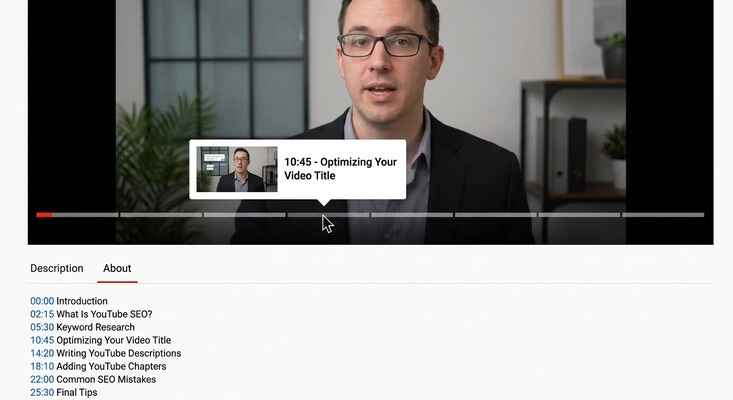
Instead of making someone watch a 30-minute video from beginning to end to find one specific topic, chapters allow them to go directly to that section.
For example, a video titled “Complete Guide to YouTube SEO” might include chapters such as:
- 00:00 Introduction
- 02:15 What Is YouTube SEO?
- 05:30 Keyword Research
- 10:45 Optimizing Your Video Title
- 14:20 Writing YouTube Descriptions
- 18:10 Adding YouTube Chapters
- 22:00 Common SEO Mistakes
- 25:30 Final Tips
These chapter titles appear along the video’s progress bar, allowing viewers to see how the video is organized as they watch.
You can also find chapter information in the video’s description. When a viewer clicks a chapter title, YouTube takes them directly to the corresponding timestamp.
How Do YouTube Chapters Work?
The basic concept is simple: a timestamp tells YouTube where a section begins, while the text next to it tells viewers what that section is about.
For example:
00:00 Introduction
03:25 What Are YouTube Chapters?
07:10 How to Add Chapters
12:30 Common Mistakes
15:45 Best Practices
Each timestamp represents a specific point in the video. When viewers select a chapter, the video automatically moves to that point.
On mobile devices, chapters can appear as a scrollable timeline beneath the video player, making it easier to browse through different sections without manually dragging the progress bar.
Chapter information can also contribute to how video content is presented in Google Search. In some cases, Google may display specific moments from a video when they are relevant to a user’s search query. This gives viewers the opportunity to jump directly to the part of the video that addresses their question.
For businesses, this makes chapters more than a navigation tool. They’re also a simple way to give your video clearer structure and additional context for both viewers and search platforms.
How to Add Chapters to YouTube Videos
Adding chapters to a YouTube video doesn’t require any technical skills. In most cases, all you need to do is add correctly formatted timestamps to your video’s description.
There is no separate chapter tool you need to install or activate. You simply add the timestamps and chapter titles to the description, and YouTube can recognize them as chapter markers.
Here’s how to do it.
Step 1: Add Timestamps to Your Video Description
Open your video description and start listing the timestamps in this format:
00:00 Introduction
01:50 What Are YouTube Chapters?
04:50 Why YouTube Chapters Are Ignored
06:00 Three Steps to Add YouTube Chapters
08:00 How to Optimize Your Chapter Timestamps
11:00 How to Use YouTube Chapters Correctly
13:00 Common YouTube Chapter Mistakes
The first timestamp must start at 00:00. Each timestamp should be followed by a short, descriptive chapter title.
Formatting matters. If your timestamps aren’t formatted correctly, YouTube may not recognize them as chapters.
Step 2: Include at Least Three Timestamps
Your description should contain at least three timestamps for YouTube to create chapter markers.
Simply adding one or two timestamps isn’t enough. Think of chapters as a structured sequence: you need multiple sections for YouTube to identify the video’s different parts.
Step 3: Make Each Chapter at Least 10 Seconds Long
Each chapter should be at least 10 seconds long.
For example, if one chapter begins at 02:00 and the next begins at 02:07, the first section is only seven seconds long. It won’t meet the minimum duration required for a chapter.
Instead, make sure there is enough time between each timestamp for every chapter to contain meaningful content.
And that’s it.
Once you save the video description with properly formatted timestamps, YouTube can automatically turn them into chapter markers on the video’s progress bar. They may not appear instantly, so give YouTube some time to process the changes before assuming something went wrong.
YouTube Chapter Template You Can Copy
If you’re adding chapters to your videos for the first time, you can use this simple template:
00:00 Introduction
00:00 Chapter One
00:00 Chapter Two
00:00 Chapter Three
00:00 Chapter Four
00:00 Conclusion
Replace each 00:00 with the actual starting time of that section and replace the placeholder titles with descriptive chapter names.
The most important thing is to make sure the timestamps accurately match the content that begins at each point.
Can YouTube Automatically Generate Chapters?
Yes. YouTube can also automatically generate chapters for eligible videos.
Instead of manually creating every chapter, YouTube can analyze the video’s content and identify potential section breaks. It may then suggest or generate chapter markers based on those transitions.
This can save creators time, but automatic chapters shouldn’t necessarily be your final solution.
AI-generated chapters may not always identify the most important structural transitions in a video. The titles can also be too generic or fail to describe the section in a way that clearly communicates its value to the viewer.
For that reason, automatically generated chapters are best treated as a starting point rather than a replacement for intentional optimization.
At Next Global Wave, we recommend reviewing your chapters manually and creating descriptive titles that accurately represent what viewers will find in each section. The goal isn’t simply to create more chapter markers. It’s to create a useful structure that makes the video easier to understand, navigate, and discover.
Why Do YouTube Chapters Matter for SEO?

This is one of the most underrated aspects of YouTube optimization.
Many creators think of chapters simply as a navigation feature. And yes, they make it easier for viewers to move through a long video. But they can also provide additional context about the topics covered in that video.
A well-structured video can contain several distinct topics within a single piece of content. Chapters make those sections more explicit by pairing specific timestamps with descriptive titles.
For example, suppose your video is titled:
How to Optimize a YouTube Channel
The video might include chapters covering:
- Channel SEO
- YouTube thumbnails
- Click-through rate (CTR)
- Thumbnail audits
- YouTube Analytics
These aren’t necessarily separate videos. They’re different topical sections within one video.
When chapter information is available, search engines may use those sections to better understand and present specific moments from the video. Google can sometimes display video key moments in search results, allowing users to jump directly to a relevant section rather than starting the video from the beginning.
That creates another potential discovery path for your content.
One Video Can Address Multiple Search Intentions
Consider a 15-minute YouTube video that covers five closely related topics.
Without clear chapter structure, the video’s primary title and overall content provide most of the context about what the video covers.
With chapters, each section can clearly communicate a different topic.
For example:
Video: How to Optimize a YouTube Channel
Chapters:
00:00 Introduction
02:10 YouTube Channel SEO
05:15 How to Create Better Thumbnails
08:00 Improve Your CTR
10:30 Thumbnail Audit
12:20 YouTube Analytics
Now the video has a clearly defined topical structure.
Someone searching for “how to improve YouTube CTR” may be interested specifically in the section discussing CTR. Someone searching for “YouTube thumbnail audit” may be interested in another section.
This doesn’t mean that adding chapters automatically makes your video rank for all of these queries. Search rankings depend on many factors, including relevance, content quality, authority, engagement, and search intent.
However, chapters give search engines more structured information about the different topics covered within the video, which can create additional opportunities for relevant video moments to appear in search.
Chapters Can Increase the Search Surface Area of a Video
This is where chapters become particularly interesting for businesses.
A single long-form video doesn’t necessarily have to serve only one search intent.
If the video genuinely covers several related questions, descriptive chapters can help communicate that topical depth.
For example, a 20-minute video about YouTube SEO might answer questions about:
- Keyword research
- Video titles
- Descriptions
- Thumbnails
- CTR
- Analytics
- Watch time
Instead of presenting the video as one large block of information, chapters divide it into meaningful topical sections.
Google may then use relevant moments from the video as key moments when they match a user’s search.
So, rather than thinking about chapters as simply “timestamps on the progress bar,” think of them as another layer of content structure.
Our Experience at Next Global Wave
At Next Global Wave, we’ve found that adding well-structured chapters to longer, high-performing videos can create a clearer topical structure and improve the way those videos are presented in search.
We’ve also observed increases in Google Search impressions for videos where chapters were implemented systematically. However, chapters are only one part of a broader YouTube and search optimization strategy, so we don’t treat them as the sole reason for an increase in impressions.
The bigger takeaway is simple:
If your video already contains valuable information, don’t make viewers or search engines work harder than necessary to understand its structure.
Use chapters to clearly define the major sections, give each section a meaningful title, and make it easier for viewers to find exactly what they’re looking for.
For businesses publishing long-form YouTube content, this is a relatively small optimization that can improve usability while giving your content additional structural context across YouTube and Google.
When Should You Use YouTube Chapters?
YouTube chapters are most useful when a video is long enough to contain several meaningful sections and viewers may want to navigate directly to a specific part.
They are particularly valuable for long-form videos covering multiple topics, questions, problems, or solutions.
For example, imagine a business video that first explains a problem companies are facing, then explores why the problem occurs, and finally provides a step-by-step solution. Breaking that video into chapters makes it easier for viewers to move between those sections.
Chapters work especially well for:
- Tutorials and how-to guides
- Educational videos
- Product demonstrations
- Interview and podcast episodes
- Webinars and presentations
- Business explainers
- Industry analysis
- Long-form guides
- Videos answering multiple related questions
The key question isn’t simply “Is my video long enough?”
Instead, ask:
Does my video contain distinct sections that a viewer might want to find or revisit?
If the answer is yes, chapters can be useful.
Use Chapters When Your Video Targets Multiple Search Intents
There is another situation where chapters can be particularly valuable: when you have created one comprehensive video that answers several closely related search queries.
For example, suppose you create a video called “How to Optimize a YouTube Channel.”
The video might cover:
- YouTube keyword research
- Channel SEO
- Video titles
- Thumbnail optimization
- Click-through rate
- YouTube Analytics
These are different topics, but they all belong to the same broader subject.
By creating descriptive chapters, you give viewers a clear way to navigate those sections. You also provide YouTube and search engines with additional context about the different topics covered in the video.
This can be especially useful when you believe one comprehensive video can answer several related questions.
However, chapters aren’t a shortcut to rankings. Simply adding timestamps doesn’t guarantee that a video will rank for multiple keywords or appear in Google Search. The video still needs to be relevant, useful, and aligned with the searcher’s intent.
Think of chapters as one additional optimization layer that helps communicate the structure of content you’ve already created.
When Should You Skip YouTube Chapters?
Chapters aren’t necessary for every video.
For very short videos, adding multiple chapters can create more complexity than value. If someone can easily understand and navigate a three- or four-minute video by looking at the progress bar, a long list of timestamps may feel unnecessary.
There’s also little reason to divide a short video into numerous tiny sections simply because you can.
The same principle applies to videos where the content doesn’t naturally break into distinct sections.
Avoid Chapters for Narrative and Documentary-Style Content
Chapters may also be a poor fit for story-driven, narrative, and documentary-style videos.
These formats often depend on viewers experiencing the story in sequence. The buildup, transitions, reveals, climax, and conclusion are part of the viewing experience.
If a documentary about Antarctica builds toward an important discovery, for example, giving viewers easy navigation to the conclusion may encourage some of them to skip directly to the ending.
That can weaken the intended narrative flow.
This doesn’t mean chapters are always harmful for documentaries or narrative videos. A documentary that contains clearly separated informational sections may still benefit from them. But if the primary purpose of the video is to tell a story from beginning to end, chapters may not be necessary.
The rule is simple:
Use chapters when navigation adds value. Skip them when navigation undermines the experience.
How to Structure YouTube Descriptions With Chapters

Your YouTube chapters don’t exist in isolation. They are part of your video’s overall description structure.
A well-organized description should make it easy for both viewers and search engines to understand what the video is about.
At Next Global Wave, we recommend placing the chapters after the opening summary and primary CTA, followed by the supporting description text and relevant links.
A simple structure looks like this:
Line 1: Video summary with the primary keyword
Line 2: Primary CTA
Lines 3–4: Brief explanation of the video’s value
Blank line
Chapters: Timestamps and chapter titles
Blank line
Body: Approximately 150–300 words of useful, naturally optimized text
Blank line
Links: Website, social profiles, related videos, and other relevant resources
Example YouTube Description Structure
Suppose you’ve created a documentary about Antarctica.
Your description could begin like this:
Video summary:
This video explores the secrets of Antarctica, from its unusual history to the mysteries surrounding the world’s most remote continent.
Primary CTA:
Watch the full documentary and explore the untold stories connected to Antarctica.
Brief expansion:
Antarctica has long been associated with mystery, extreme environments, and fascinating historical stories. In this video, we explore some of the most unusual events, myths, and historical discoveries connected to the continent.
Then comes your chapter section:
00:00 Introduction
01:45 The History of Antarctica
04:20 The Mystery of the Antarctic Landscape
07:10 Untold Stories From Antarctica
10:30 Antarctica’s Most Unusual Discoveries
13:00 Common Myths About Antarctica
16:15 What We Know Today
18:00 Conclusion
After the chapters, you can add the supporting body copy:
Antarctica has fascinated explorers, researchers, and historians for generations. From its extreme climate to its unusual history, the continent continues to attract attention from people around the world. In this documentary, we explore the stories, discoveries, and mysteries that have shaped how people understand Antarctica.
Finally, add your relevant links:
Website
Related Videos
Social Media
Additional Resources
This structure creates a clear hierarchy within the description.
The viewer can quickly understand what the video covers, find the chapter they are interested in, read more about the topic, and access relevant links without having to search through an unstructured block of text.
At the same time, the description provides additional textual context around the video. Search engines can crawl and interpret this information, while YouTube can use the video’s title, description, chapters, and other signals to understand its subject matter.
Keep Chapter Titles Clear and Descriptive
One final point is especially important: don’t treat chapter titles as filler text.
A chapter titled “Part 2” tells a viewer almost nothing.
A title such as “How to Optimize YouTube Thumbnails” immediately communicates what the section contains.
Your chapter titles should therefore describe the actual topic covered at that timestamp.
Good chapter titles are:
- Specific
- Concise
- Accurate
- Easy to scan
- Relevant to the content
This makes the chapters useful for viewers first, while also giving search platforms clearer information about the video’s structure.
Ultimately, the goal isn’t to add as many timestamps as possible.
The goal is to turn a long video into a clearly organized resource that viewers can understand, navigate, and return to easily.
Common YouTube Chapter Mistakes to Avoid
Adding YouTube chapters is simple, but small formatting mistakes can prevent them from working correctly. If you’re using chapters as part of your YouTube SEO strategy, avoid these common errors.
1. Starting the First Chapter Somewhere Other Than 00:00
The first chapter should begin at 00:00.
For example, don’t start your chapter list like this:
00:15 Introduction
02:10 Keyword Research
05:30 Video Optimization
Instead, start with:
00:00 Introduction
02:10 Keyword Research
05:30 Video Optimization
The 00:00 timestamp establishes the beginning of your chapter structure. If the first timestamp doesn’t start at 00:00, YouTube may not recognize the timestamps as chapters.
2. Using Fewer Than Three Timestamps
You also need enough timestamps to create a meaningful chapter structure.
Use at least three timestamps rather than adding only one or two.
For example, this isn’t enough:
00:00 Introduction
04:30 Conclusion
Instead:
00:00 Introduction
02:15 Main Problem
04:30 Solution
Three or more timestamps give YouTube the structure it needs to identify separate sections of the video.
3. Creating Chapters That Are Too Short
Each chapter should be at least 10 seconds long.
If you place timestamps only a few seconds apart, YouTube may not recognize the resulting section as a chapter.
For example:
02:00 Introduction
02:07 Keyword Research
The first section is only seven seconds long.
Instead, give every chapter enough time to contain a meaningful section of content.
4. Using Generic Chapter Titles
This is one of the biggest missed opportunities.
Titles such as:
- Introduction
- Part 1
- Part 2
- Section 3
- Summary
don’t tell viewers much about what they’ll find in each section.
More descriptive titles provide much more context.
Instead of:
05:20 — Part 2
Try:
05:20 — How to Optimize YouTube Video Titles
Your chapter titles should clearly describe the section while using natural language that humans can understand.
When appropriate, include relevant terminology or keywords—but don’t force keywords into every title simply for SEO. Clarity should come first.
5. Forgetting to Update Chapters After Editing a Video
This mistake is easy to make.
Suppose you publish a 20-minute video and create chapters for it. Later, you trim the introduction, remove a section, or move part of the video to another timestamp.
Your original chapter timestamps may no longer match the actual content.
For example, if “Keyword Research” originally started at 04:30 but you remove 45 seconds from the introduction, that section may now begin at 03:45.
If you don’t update the timestamp, clicking the chapter can take viewers to the wrong part of the video.
Whenever you re-edit a video, review your chapters.
Check every timestamp against the actual video and make sure each chapter still begins where its title says it does.
6. Relying Entirely on Auto-Generated Chapters
YouTube can automatically generate chapters for eligible videos, which can be useful when you don’t have time to create them manually.
But don’t assume the automatically generated structure is always the best one.
YouTube’s system may identify reasonable section breaks, but the titles may be too broad, generic, or different from the terminology your audience actually uses.
You can use automatic chapters as a starting point, then review and improve them manually.
Rewrite generic titles into specific, descriptive ones. Make sure every title accurately represents the content that follows and is easy for viewers to understand.
For example:
Auto-generated:
05:20 — Introduction to SEO
Better:
05:20 : How YouTube Keyword Research Works
The second title gives viewers much more information about what they will find at that timestamp.
7. Adding Chapters Just for the Sake of SEO
Chapters are an optimization feature, but they shouldn’t be treated as a keyword-stuffing opportunity.
Don’t create artificial sections just to insert more keywords into your description.
Your chapters should reflect real transitions in the video.
If your video naturally contains five meaningful sections, create five useful chapters. If it contains only three, don’t force it into ten sections.
The best chapter structure is one that serves the viewer first.
A Simple YouTube Chapter Checklist
Before publishing your video, run through this checklist:
- Start the first timestamp at 00:00.
- Include at least three timestamps.
- Make sure each chapter meets the minimum duration requirement.
- Use accurate timestamps.
- Write clear and descriptive chapter titles.
- Use relevant terminology naturally.
- Make sure every title matches the content at that timestamp.
- Review chapters whenever you edit the video.
- Don’t rely blindly on auto-generated chapters.
- Don’t add unnecessary chapters purely for SEO.
The principle is simple: YouTube chapters should make your content easier to navigate, not harder to understand.
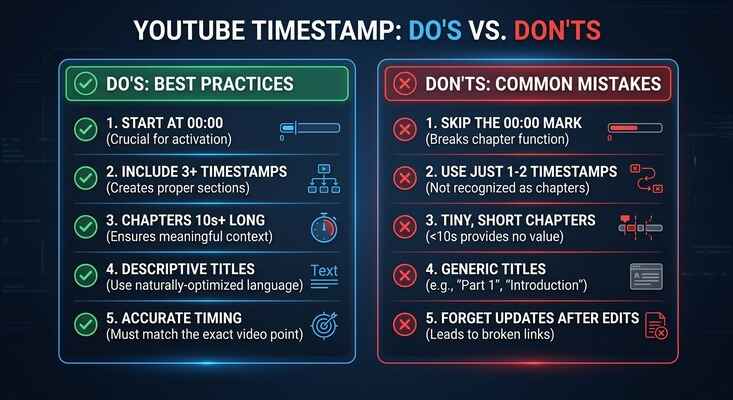
When your timestamps are accurate and your chapter titles clearly communicate the value of each section, you create a better experience for viewers while giving YouTube and search engines clearer context about the content of your video.
How to Add Chapters to Your Existing YouTube Video Library
You don’t have to add chapters only to new videos.
If you already have a library of published videos without chapters, you can add them retroactively. In fact, updating your existing library can be one of the most practical ways to get more value from content you’ve already created.
Instead of going through hundreds of videos at once, start with the videos that already show signs of search visibility
This approach allows you to focus your effort where it is most likely to be useful.
At Next Global Wave, we consider chapter optimization part of the broader metadata review process. When auditing an existing YouTube library, we look beyond the video title and description and assess whether the video’s structure, chapters, metadata, and search intent are aligned.