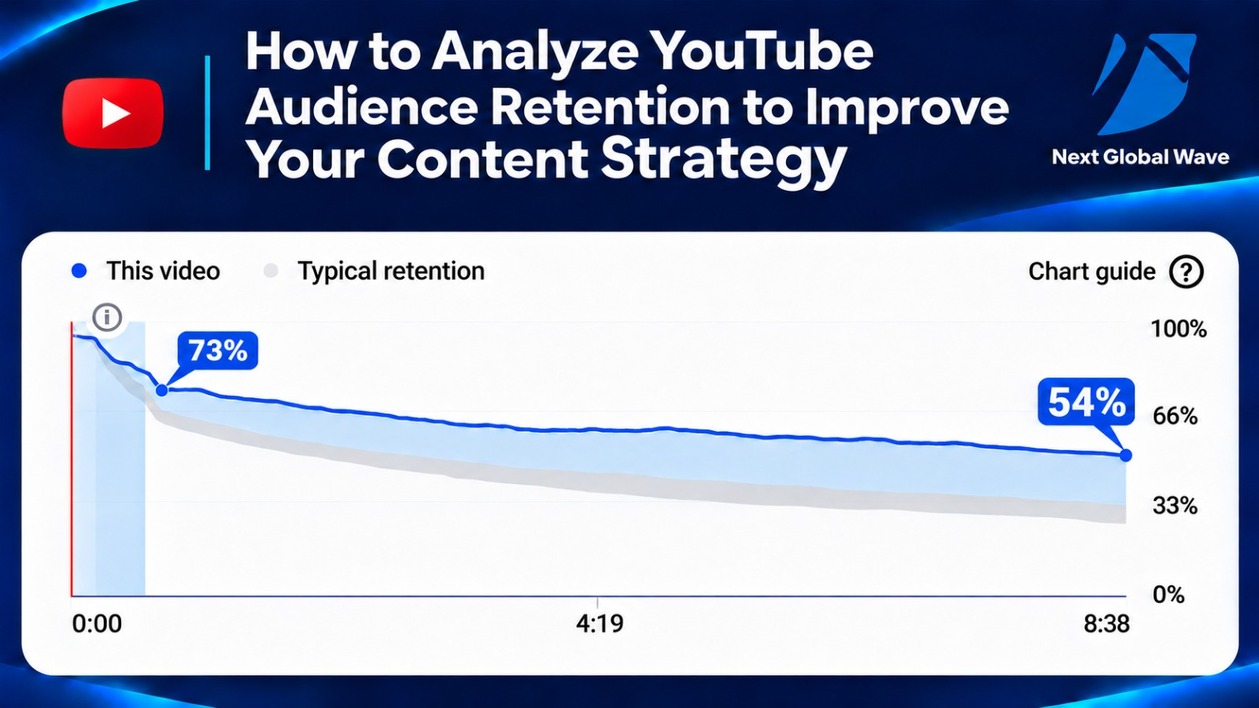
Audience retention plays a vital role in YouTube automation because it helps creators understand what keeps viewers watching and what makes them leave. By analyzing audience retention data, you can identify opportunities to improve your existing content and make better decisions about your next video.
YouTube audience retention shows how viewers’ attention changes throughout a video. Available through YouTube Studio, this report helps you understand which sections hold viewers’ attention, where they lose interest, and which moments may need improvement.
For creators managing multiple videos or running a YouTube automation channel, these insights can support a more data-driven content strategy. Instead of relying on assumptions, you can use video analytics to identify patterns and apply those findings to future uploads.
How to Check Audience Retention in YouTube Studio
To review audience retention for a video on a desktop computer, follow these steps:
- Open YouTube Studio.
- Select Content from the left-hand menu.
- Choose the video you want to analyze.
- Open the video’s Analytics section.
- Select the Engagement tab.
- Find the Audience retention report.
Depending on the available data and report layout, you may also see information about key moments for audience retention.
Keep in mind that audience retention data can take approximately one to two days to process. Therefore, you may need to wait after publishing a video before its retention report becomes available.
What Are the Key Moments in YouTube Audience Retention?
YouTube’s audience retention report can highlight specific moments that help explain how viewers respond to your content. These insights can help you identify successful sections and areas where you could improve your video structure.
The key moments for audience retention generally include the following:
- Intro
The intro metric shows what percentage of viewers were still watching after the first 30 seconds.
A high intro percentage can indicate that your opening matches viewers’ expectations based on your title and thumbnail and gives them a reason to continue watching.
If many viewers leave during the first 30 seconds, consider whether your introduction takes too long to reach the point or whether the content delivers on the promise made by your title and thumbnail.
You can experiment with different opening styles, introduce the main benefit earlier, and ensure that your title and thumbnail accurately represent the video.
- Top Moments
Top moments are sections where viewers remain engaged without the usual drop-off. These moments can help you identify content that holds attention particularly well.
For example, viewers might stay longer during a practical demonstration, an interesting explanation, or a particularly useful part of a tutorial.
If your top moments appear later in the video, consider whether you could introduce some of that compelling content earlier. This may help viewers discover the video’s value sooner.
- Spikes
Spikes appear when a section receives more views or replays than surrounding sections. They can indicate that viewers are rewatching a moment or sharing it with others.
However, a spike doesn’t always mean that viewers found the content engaging. They may also be replaying a confusing explanation or skipping directly to a particular section.
Review the corresponding content to understand what might have caused the spike and whether the section offers a useful lesson for future videos.
- Dips
Dips indicate sections where viewers may have stopped watching or skipped ahead.
If you notice a significant dip, review that part of the video. A lengthy explanation, repetitive content, an unnecessary transition, or a mismatch between expectations and delivery could contribute to the decline.
Use these observations to identify potential improvements rather than assuming that every dip has the same cause.
How to Read and Analyze the YouTube Audience Retention Graph
The audience retention graph provides a visual representation of how viewers watch your video over time. Understanding its patterns can help you identify where your content succeeds and where viewers may lose interest.
A flat line: When the graph remains relatively flat, viewers are continuing to watch that section without a significant change in retention.
A gradual decline: This indicates that the percentage of viewers still watching is decreasing over time. Review the relevant sections to identify opportunities to improve pacing, clarity, or content relevance.
A spike: More viewers are watching or rewatching a particular moment, or viewers may be skipping directly to that section. Investigate the content to understand why.
A dip: Viewers may be leaving or skipping a specific section. Examine the video at that point to identify possible reasons.
You can also compare a video’s performance with typical retention data for your ten latest videos of similar length, where this comparison is available. This helps you evaluate performance against a more relevant benchmark than comparing videos with very different lengths or topics.
The most important step is to connect the graph with the actual video. Analytics can show you where viewer behavior changes, but reviewing the corresponding content helps you investigate why.
Average View Duration vs. Average Percentage Viewed
Two important metrics in YouTube Analytics are average view duration (AVD) and average percentage viewed (APV). Both help you understand viewing behavior, but they measure it differently.
Average view duration (AVD) measures the average amount of time viewers spend watching a video.
Average percentage viewed (APV) measures the average proportion of a video watched.
You can calculate average percentage viewed using this formula:
Average Percentage Viewed = (Average View Duration ÷ Video Length) × 100
Make sure both values use the same time units.
For example, suppose your video is five minutes long and its average view duration is 2.5 minutes.
APV = (2.5 ÷ 5) × 100
APV = 50%
This means the average view duration is equivalent to 50% of the video’s length.
Important: An average percentage viewed of 50% does not mean that half of your audience watched the video until the end. Some viewers may have watched the entire video, while others watched only a small portion. APV summarizes viewing duration across views rather than showing how many individual viewers reached the end.
Together, AVD and APV can help you evaluate how long viewers watch and how that duration compares with your video’s total length.
How to Use Audience Retention Data to Improve Your Next Video
The real value of audience retention analytics lies in how you use the findings to improve future content.
Start by identifying the strongest and weakest sections of your video. Review the intro, top moments, spikes, and dips to understand how viewers responded to different parts of the content.
Then look for patterns you can test in future uploads.
For example:
- If viewers leave early, experiment with a more direct introduction.
- If a particular demonstration holds attention, consider using similar demonstrations in related videos.
- If a section experiences a significant dip, investigate whether it contains unnecessary repetition or unclear explanations.
- If a compelling moment appears late in the video, consider introducing its key benefit earlier.
- If similar videos consistently perform better, examine their structure, pacing, and topic relevance.
You can also use these insights when planning a content calendar. If a particular topic or format consistently holds viewers’ attention, consider exploring related subjects while maintaining the quality and relevance that made those videos successful.
For YouTube automation channels, this creates a repeatable improvement process: publish a video, review its analytics, identify opportunities, and apply those findings to your next upload.
Audience retention data won’t tell you exactly what to change, but it can help you make more informed decisions about what to test next.
Writing
Use the Hook-Delivery Cycle to Keep Viewers Watching
A strong opening hook can grab a viewer’s attention, but it doesn’t necessarily keep them watching until the end. This is where the hook-delivery cycle comes in.
Most creators understand the importance of starting a video with a compelling hook. They might open with an intriguing question, a curiosity gap, or a promise that tells viewers what they will gain by watching. However, once the introduction ends, many scripts move into straightforward explanations without giving viewers another reason to stay.
The hook-delivery cycle solves this problem by creating a continuous sequence of hooks and payoffs throughout the video.
Here’s how it works: Start with a compelling hook, deliver on the promise you made, and then introduce a new question, insight, or curiosity gap that leads naturally into the next section. Every time you answer one question, give viewers another reason to keep watching.
For example, imagine you’re creating a video about improving YouTube audience retention. You might open with:
“Your viewers aren’t leaving because your videos are too long. They’re leaving because you aren’t giving them enough reasons to stay. Here’s how to fix that.”
After explaining the first retention strategy, don’t simply move to the next heading. Introduce a new hook:
“But even if your introduction is perfect, there’s another point in your video where viewers are likely to lose interest. And most creators overlook it.”
Now viewers have a reason to continue watching.
The goal is to structure your script as a series of connected mini-stories rather than one long block of information. Each segment should deliver something valuable while creating anticipation for what comes next.
This approach can help maintain audience interest, reduce unnecessary drop-offs, and encourage viewers to watch longer. When you review your audience retention graph, look for sections where viewers consistently leave and consider whether those transitions need a stronger hook or a more compelling payoff.
The takeaway: Don’t use your hook only at the beginning. Build a hook-delivery cycle into your entire script so every section gives viewers a reason to stay for the next one.
Create a Sense of Relatability and Involve Your Audience
Viewers are more likely to keep watching when they feel that a video speaks directly to them. Instead of simply presenting information, involve your audience in the experience. Ask questions they can relate to, address problems they are trying to solve, and explain why you’re taking a particular action.
For example, rather than opening with:
“Hey guys, today I’m going to show you how to improve your YouTube videos.”
Start with something more engaging:
“Have you ever noticed that viewers click on your videos but leave within the first 30 seconds? Let’s look at why that happens and how you can fix it.”
The second approach immediately connects with a problem your audience may be experiencing. It gives viewers a reason to pay attention because they want to know what happens next.
Pay Special Attention to the First 30 Seconds
The first 30 seconds of your video are particularly important. This is where viewers decide whether the content matches what they expected from your title and thumbnail.
Instead of spending too much time introducing yourself or explaining what you’re about to discuss, get to the point. Show a relevant action, result, demonstration, or problem first. Then provide the context behind it.
For example, if you’re creating a tutorial, show the final result or an interesting part of the process before explaining how you achieved it. This gives viewers an immediate reason to continue watching.
You can also experiment with pattern interrupters to maintain attention. These include:
- Changing camera angles or shot composition.
- Using relevant images, screen recordings, or visual demonstrations.
- Adding sound effects or changes in audio.
- Introducing relevant memes or unexpected visual moments.
- Switching between talking-head footage and supporting visuals.
Use these elements purposefully. The goal isn’t to add constant visual effects but to keep the presentation engaging without distracting viewers from the main message.
Use YouTube Analytics to Evaluate Your Introduction
YouTube Studio’s audience retention report shows what percentage of viewers are still watching after the first 30 seconds. This is commonly referred to as intro retention.
A strong intro retention result suggests that your opening is meeting viewers’ expectations. If a significant number of viewers leave during this period, review whether your introduction delivers on the promise made by your title and thumbnail.
A mismatch between the title, thumbnail, and actual video content can lead to early drop-offs. Other possible reasons include a slow introduction, unnecessary explanations, or taking too long to deliver the promised value.
Use this information to improve your next video. Get to the main point faster, make your opening more relevant, and ensure the content delivers what viewers expected when they clicked.
Can You Improve Audience Retention After Uploading a Video?
Yes. YouTube Studio’s built-in video editor allows creators to trim sections from an already-published video without uploading it again. You can remove unnecessary footage from the beginning, middle, or end.
For example, if your retention graph shows a noticeable drop during a long introduction, you may be able to trim the unnecessary opening and help viewers reach the main content sooner.
However, YouTube’s editor has limitations. You can trim existing footage, but you cannot use this feature to add new footage, B-roll, text overlays, graphics, or transitions between cuts. Also, trimming a video does not guarantee an improvement in its average percentage viewed (APV); the result depends on how viewers respond to the edited version.
The key is to use retention data to identify weak sections, make practical improvements, and apply those lessons when planning your next video.
How to Increase Average View Duration on YouTube
Average view duration measures the average time viewers spend watching a video. Improving it can help you understand whether your content is holding attention for longer.
Here are four practical ways to work toward that goal.
Deliver Value Throughout the Video
Don’t put all the useful information at the beginning and fill the remaining minutes with repetition.
Give viewers a reason to continue watching by presenting meaningful information, examples, demonstrations, or insights throughout the video.
For a tutorial, this might mean moving from the basic explanation to a practical demonstration and then addressing common mistakes.
Create Natural Transitions Between Sections
Each section should connect logically to the next.
If your video covers several strategies, explain how they relate to one another rather than treating them as unrelated points.
Clear transitions help viewers understand why the next section matters.
Use Demonstrations and Visual Examples
Visual explanations can make complicated topics easier to understand.
For example, a video explaining YouTube Analytics could show the actual reporting interface and demonstrate how to interpret a retention graph.
This gives viewers something concrete to follow instead of relying entirely on verbal explanations.
Remove Content That Doesn’t Support the Main Topic
Review your video for sections that repeat information or distract from its main objective.
If a section doesn’t answer the viewer’s question, clarify an important concept, or support the overall narrative, consider shortening or removing it.
The goal isn’t simply to make videos longer. It’s to give viewers a valuable reason to keep watching.
Turn More Viewers into Engaged Viewers with NextClipGreat.com
Improving YouTube audience retention is about keeping viewers interested, delivering value at the right moments, and giving them a reason to keep watching.
From creating compelling hooks and using the hook-delivery cycle to improving your first 30 seconds, every part of your video should contribute to a better viewing experience.
At Nextglobalwave.com, we help creators improve audience retention and average percentage viewed through proven content and retention strategies. We focus on making videos more engaging, valuable, and structured to hold viewers’ attention throughout.
If you’re a busy creator struggling to manage scripting, editing, and audience engagement, let us help. We’ll help you create content that connects with your audience, keeps them interested, and gives them more reasons to watch until the end.